
M
M
e
e
n
n
u
u
M
M
e
e
n
n
u
u

A 30-minute call to clarify your next steps. Zero obligations

September 28, 2026

September 28, 2026

Agent Connectors and Data Lakes: What They Fix, and What They Leave Broken

What agent connectors are, how MCP changed them, what build vs buy really costs, and why AI agent pilots still stall without shared memory.

What agent connectors are, how MCP changed them, what build vs buy really costs, and why AI agent pilots still stall without shared memory.

Connectors and data lakes both give AI agents access to your stack. Neither gives them shared memory or clean handoffs, which is why most pilots stall before production.

The question, “Should you build your agent connectors or buy them?” reliably starts an argument among engineering leaders.

One camp says connectors are commodity plumbing — an afternoon with an OAuth library and you’re done. The other says the integration layer is the whole product and you should never own it yourself.

You may already have an answer. The proper response is, “It depends.”

Let’s take a step back. An agent connector is the layer that lets an AI agent act on an external system: read the Salesforce record, send the Slack message, update the Notion page, query the warehouse. Without one, a model can reason about your business but cannot touch it.

Here is why it depends. A connector is cheap to build once and expensive to own forever. The first one takes a competent engineer two to four weeks. The tenth one does not take ten times as long — it takes the rest of your roadmap, because every connected vendor ships breaking changes on a schedule you do not control.

So the question is not really build-or-buy. It is whether the integration layer is a thing you want to be in the business of maintaining.

Plaid is a useful illustration of how badly that question gets misjudged. Plaid built connectors to bank accounts — unglamorous infrastructure that most of fintech treated as plumbing. On January 13, 2020, Visa agreed to acquire the company for $5.3 billion, roughly double Plaid’s last private valuation. The Department of Justice sued to block the deal on November 5, 2020, arguing specifically that the acquisition would eliminate Plaid’s potential to compete in online debit. The deal was abandoned on January 12, 2021.

A connector layer does not get valued at $5.3 billion, or blocked on antitrust grounds, if it is plumbing. The boring layer was the strategic one.

That is the first thing to hold onto. Here is the second: connectors are necessary and they are not sufficient, and the gap between those two words is where most agent deployments die.

There is a second question sitting next to the first. Many teams already own a data lake. Why wire agents into every live system when they could read from the lake instead? That one also depends, and it gets its own section.

This piece covers six topics. First, we define agent connectors and break down the four layers inside one. Second, we look at how MCP changed what a connector is, with the adoption data. Third, we work through the economics of building versus buying, with the arithmetic shown. Fourth, we survey the platforms you would actually evaluate. Fifth, we compare connectors with data lakes, and when an agent should use each. Finally, we examine where both stop working — the coordination problems neither solves — and what sits above them.

Free access is not free coordination

Roughly nine in ten enterprise AI agent pilots never reach production. Deloitte’s 2026 Tech Trends report puts the figure at 89 percent. The 2026 State of AI Agents report puts it at 88 percent. The post-mortems are consistent, and they are not about models. The agent understood the task. It picked the right tool. What killed the pilot was identity, permissions, approval paths, audit trails, and the integration decisions nobody scoped.

Most of those are connector problems. Some of them are not, and telling the difference is the whole point of this piece.

What agent connectors actually are

The most common definition of an agent connector is the integration layer that lets an AI agent interact with external apps, services, databases, and tools.

Strip away the vendor language and a connector does three jobs:

  1. It holds credentials so the agent doesn’t. OAuth tokens, API keys, refresh cycles, per-user scoping.

  2. It translates. An API returns a 400-line JSON blob. A model needs a tool definition it can reason about. The connector sits between them.

  3. It executes and reports back. The call goes out, something happens, and the connector turns the result into something the agent can act on rather than hallucinate around.

The one adjustment we make to this definition is to include observability inside it rather than treat it as a separate concern. The reason is practical: a connector you cannot audit is one your security team will not approve, which makes it a connector you do not actually have. In our experience the logging requirement is what determines whether a pilot ships, so we count it as part of the thing rather than an add-on.

The distinction that matters throughout: an API is built for a developer who read the documentation. An agent connector is built for a model that didn’t.

That sounds cosmetic. It isn’t. A tool description that’s ambiguous about whether date means created-at or modified-at produces wrong answers indefinitely, and no prompt engineering fixes it upstream.

The four layers under every agent connector

Authentication and token lifecycle

This is where in-house connector projects die. Not at the first OAuth handshake — that part is a weekend.

It dies at month four, with sixty users, each holding their own Google and Slack and HubSpot tokens, half expired, and no clean way to scope what the agent may do as a given user versus on its own authority.

Credential exposure is the leading security concern in agent deployments. Agents holding API keys, database passwords, and OAuth tokens can leak them through prompts, logs, or error messages. A serious connector layer means the agent never sees the secret.

Tool definitions the model can read

Every connected system needs its capabilities expressed as typed, named, described tools. Get this wrong and the agent calls the right system the wrong way.

There is a real tension here that nobody advertises. Platforms that normalize across vendors — one create_ticket that works for Jira, Linear, and Zendesk — buy you speed and cost you semantics. The normalized schema strips the fields that made each system specific.

For simple operations that trade is fine. For anything carrying real business logic, you want the native surface.

Execution and failure handling

Rate limits. Retries with backoff. Partial failures where three of five records wrote. Idempotency, so a retried call doesn’t send the invoice twice.

This is unglamorous and it is most of the work. It is also the difference between a demo and a system.

Observability

Every tool call, visible: what the agent invoked, with what arguments, on whose behalf, what came back, how long it took.

Without this you cannot debug a bad outcome and you certainly cannot pass a security review.

Mcp changed what a connector is

Through 2024 and most of 2025, every connector was bespoke. Each framework had its own tool format, and an integration written for one agent was worthless to the next.

The Model Context Protocol collapsed that. MCP is an open standard for how agents discover and call tools, and the adoption curve is steep enough to settle the question of whether to standardize on it.
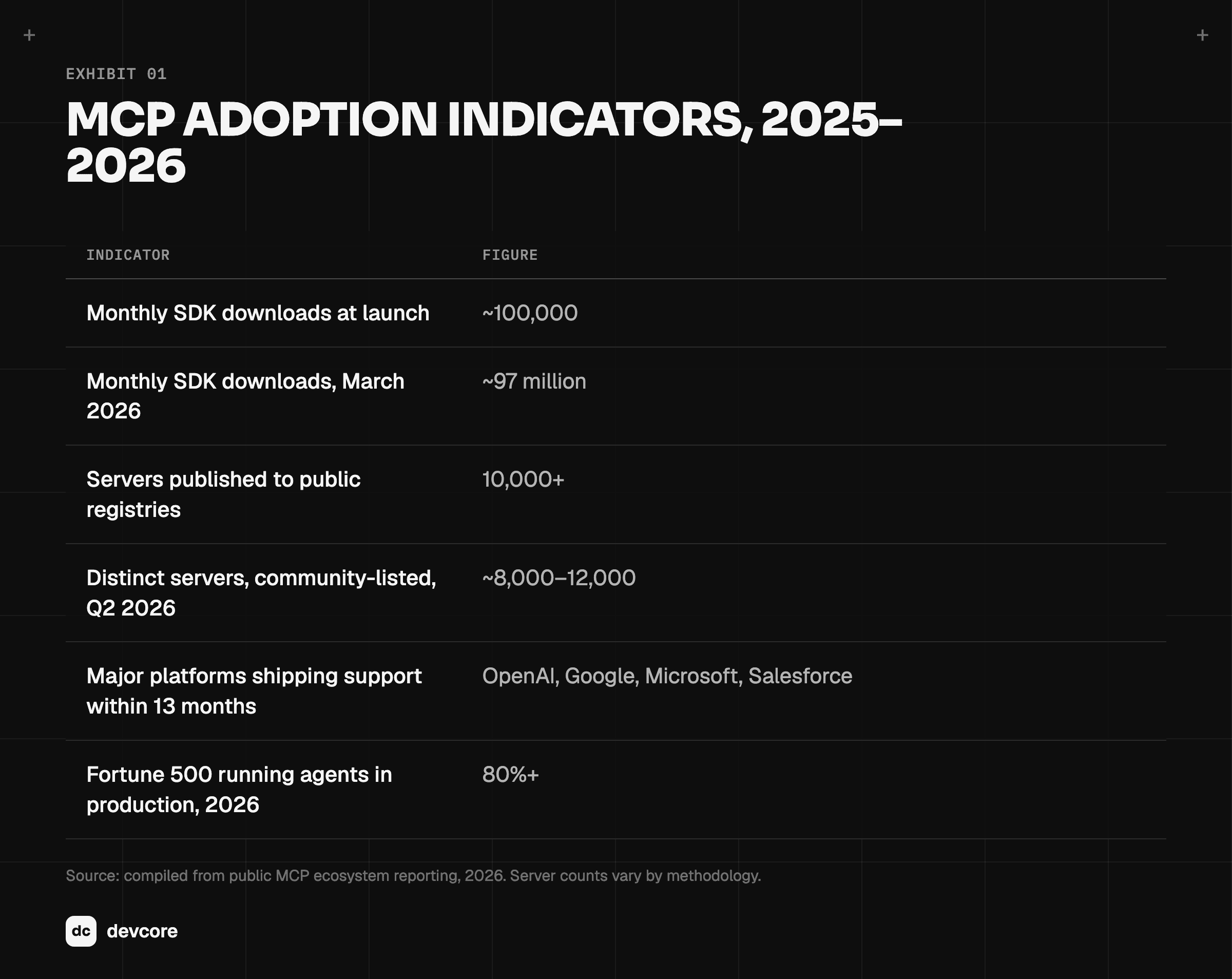
MCP adoption indicators 2025–2026: SDK downloads, servers and platform support

Note: Server counts vary materially by methodology. Some sources count only verified-runnable servers; others count every catalogued instance, which is how one dataset reaches roughly 90,000. Treat the registry figure as the conservative one.

The July 2026 release was the consequential one. MCP moved from a tool-calling API toward an operating layer for agents, and Enterprise-Managed Authorization graduated from experimental to production-grade.

That second part unblocked a lot of stalled procurement. EMA gives a security team a real answer to “who authorized this agent to do that, and can we revoke it centrally?”

For a buyer, three consequences follow:

  • Write once. An MCP server built for one agent works with Claude, ChatGPT, Cursor, and whatever you adopt in eighteen months.

  • Your integration work outlives your model choice. This is the strongest argument for standardizing on MCP even if you are happy with your current stack.

  • Security review gets a vocabulary. “It’s MCP with EMA and scoped OAuth” is a sentence a CISO can evaluate. “We wrote a custom wrapper” is not.

The economics of build versus buy

The comparison content on this topic tends to skip the money. Let’s do the arithmetic.

Assume a mid-market team with six integrations. Each takes three engineering weeks to build and roughly two engineer-days per month to maintain — version changes, expired credentials, schema drift, the occasional outage.

The build is 18 weeks of engineering (18 = 6 × 3). The maintenance is 144 engineer-days per year (144 = 6 × 2 × 12). At a loaded rate of $600 per day, the maintenance alone runs $86,400 annually, and that number grows with every integration added and never shrinks on its own.
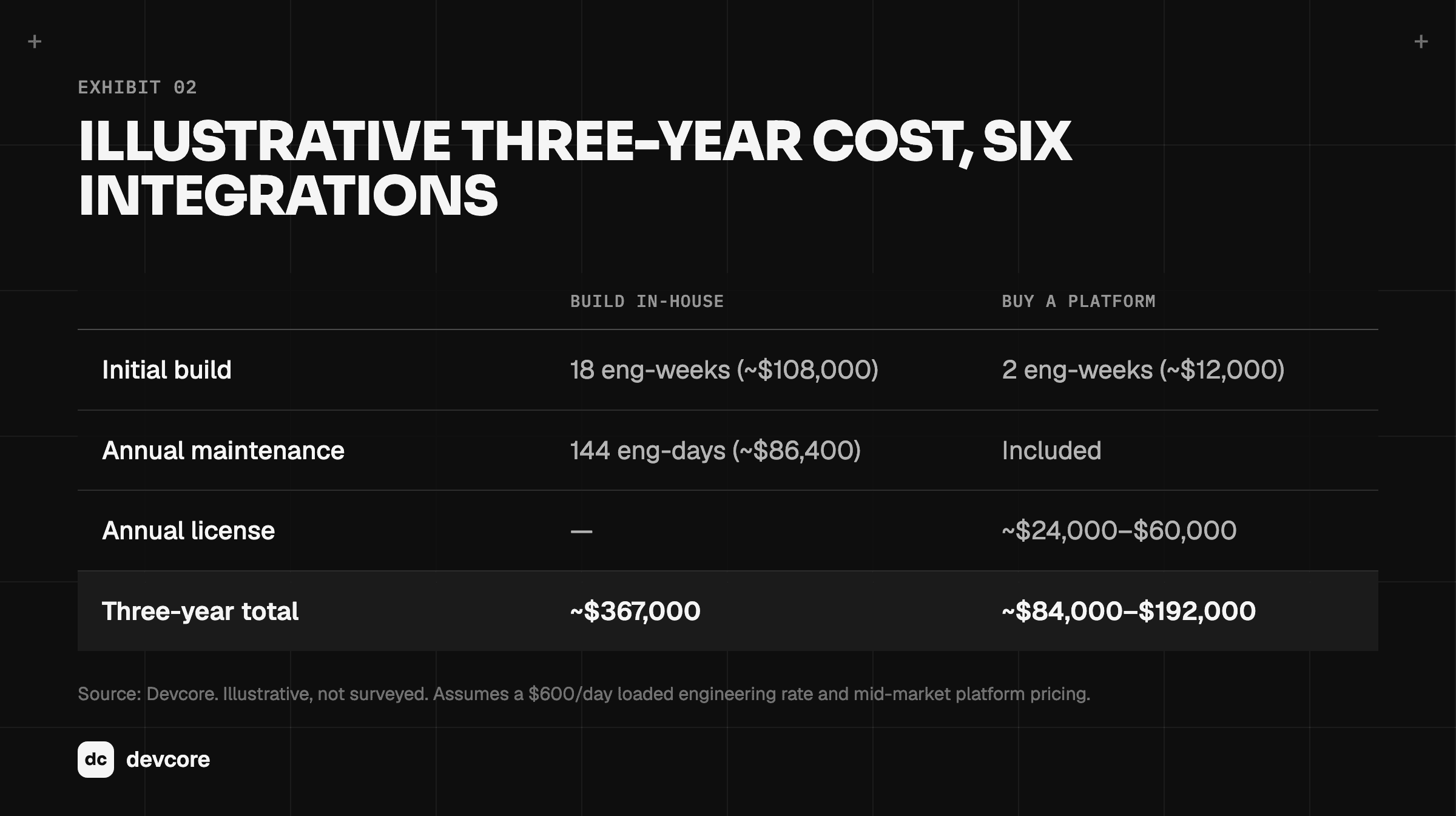
Three-year cost of building vs buying agent connectors for six integrations

The honest heuristic we use with clients:

  • Fewer than three integrations, stable, internal? Build. A platform is overhead you don’t need.

  • Five or more, spanning third-party SaaS with real auth? Buy. You will not win the maintenance race.

  • Anything touching regulated data or customer PII? Buy, and buy the one with the audit log your compliance team will accept.

The number that matters is not the license fee. It is whether the thing still works in month nine without an engineer babysitting it.

Who you’d actually buy from

The market sorted itself into four camps during 2025 and 2026. We have clients running on most of these. The following observations describe the shape of each camp rather than specific feature sets, which change monthly:

  • Developer-first connector platforms. Composio is the reference point, with a large prebuilt catalogue and an explicitly agent-shaped design. You get breadth and speed. You write code, and you accept their schema decisions.

  • Open-source and self-hosted. Nango is where teams land when data residency or exit cost is the deciding factor. More setup, more control, no vendor holding your integration layer.

  • Unified-API aggregators. Merge and StackOne normalize whole categories, so one integration covers every CRM or every HRIS. Strong when you are building a product that must support whatever your customer already uses. Weaker when you need the native semantics of one system, for the schema-stripping reason above.

  • Auth-and-execution specialists. Arcade.dev and Pipedream Connect concentrate on the genuinely hard part: per-user authorization and safe execution. If your blocker is “the agent needs to act as this specific employee with exactly their permissions,” start here.

The platform-native option is easy to overlook. Microsoft ships agent connectors for Microsoft 365 that register MCP servers directly into Teams and Copilot. If your company lives in that stack, the cheapest integration is frequently the one you are already licensed for.

Two closing notes on evaluation. The catalogue size on a vendor homepage is close to irrelevant — open the docs for your four critical systems and read the supported actions, because that is the only comparison that predicts anything. And this market moves quickly enough that any specific claim here has a shelf life. Verify pricing and coverage directly.

Six things to check before you commit

  1. Depth per integration, not count. “1,000+ connectors” is a marketing number. Check your four. Ignore the rest.

  2. Auth model, specifically multi-user. Can the agent act as a specific user with that user’s permissions? If every action runs as one shared service account, you have built a privilege-escalation machine and you will find out during audit.

  3. Write-path safety. Reads are forgiving. Writes are not. Look for approval gates, dry-run modes, and idempotency on anything that sends, charges, posts, or deletes.

  4. Revocation latency. When you remove someone’s access, does the agent lose it immediately or at the next token refresh? Ask for the answer in seconds.

  5. Observability an auditor will accept. Not a dashboard — an exportable, per-call record with user identity attached.

  6. Exit cost. If you leave, do you keep anything? Platforms built on open MCP servers are meaningfully easier to walk away from. Ask before you sign.

Agent connectors versus data lakes

There is a second argument that runs alongside build-or-buy. If you have already invested in a data lake, why wire agents into every live system at all? Point them at the lake and let them read. The proper response, again, is “It depends” — on whether the agent needs to know something or do something.

A data lake centralizes data from many systems, usually on cheap object storage, for analysis across all of it. For an agent, that means breadth and history: three years of orders, tickets, and invoices in one queryable place. A connector is narrower and live. It reaches one system as it stands right now, and it can act — send, update, approve.

The lake vendors have noticed agents. Snowflake, Databricks, Google BigQuery, Amazon Redshift, ClickHouse, and MotherDuck all now offer official or vendor-backed MCP servers, so a lake can be exposed to an agent through the same protocol as any SaaS tool. Snowflake’s managed server, for instance, uses Snowflake’s built-in OAuth and runs each session under the user’s default role. The table layer underneath is being valued the way Plaid was. On June 4, 2024, Databricks agreed to acquire Tabular, the company founded by the original creators of the Apache Iceberg table format. Its chief executive put the price at more than $1 billion; later reporting put it closer to $2 billion. Once again, the unglamorous layer that lets systems read each other’s data was the strategic one.
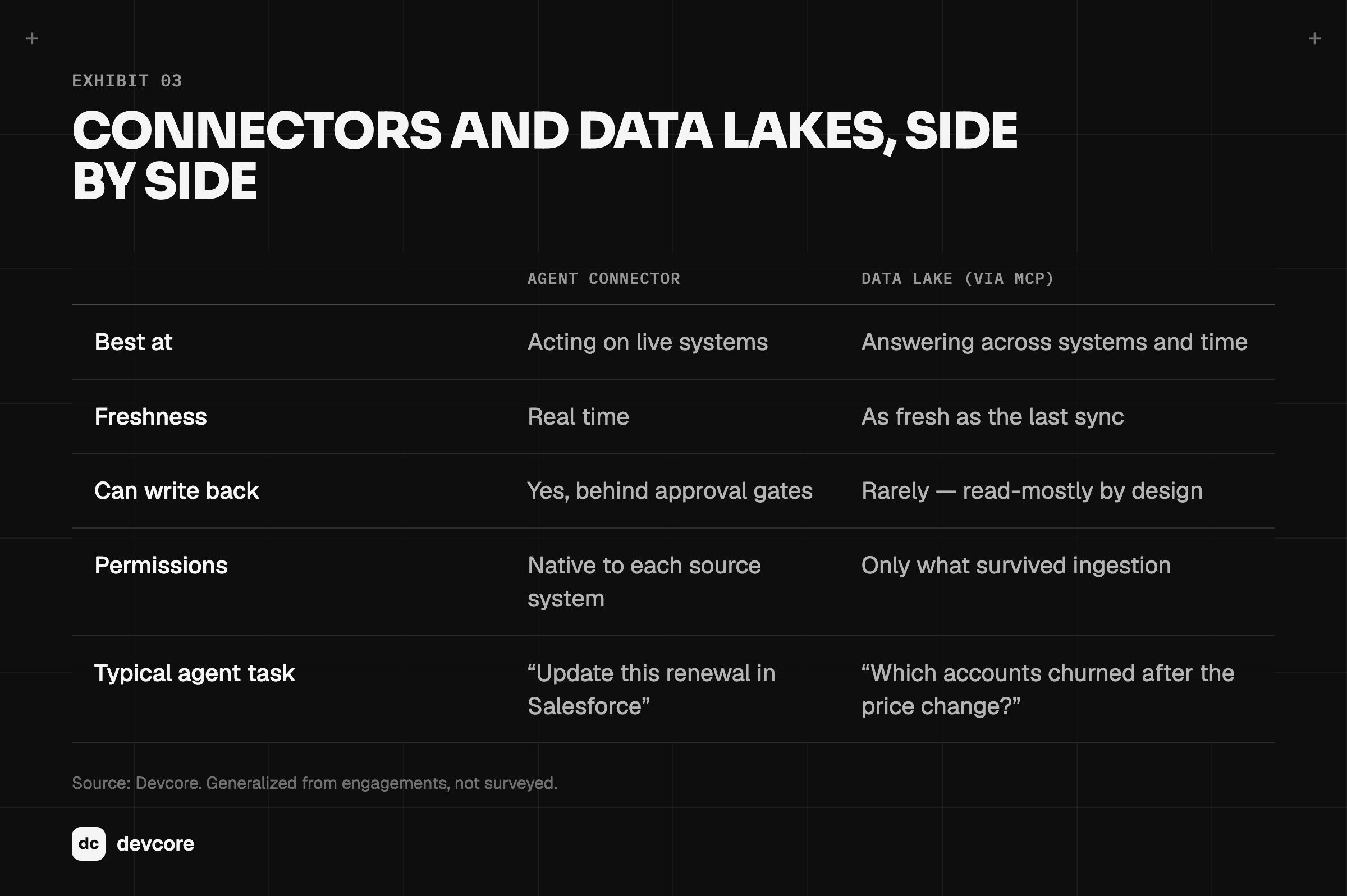
Agent connectors vs data lakes compared: freshness, write-back, permissions

The permissions row deserves a closer look. Access rules usually live at the document or record level in the source system. When that data is copied into a lake — or chunked into embeddings for retrieval — the rules often do not come along. An agent querying the lake can then surface what the person asking could never have opened in the original tool.

The fix, sometimes called entitlement propagation, carries source permissions into the lake and filters by them at query time. Ask whether your stack does it before an agent is pointed at the lake, not after.

The pattern we recommend is both, with a clear division of labor:

  • Lake for questions. Analysis, trends, anything spanning systems or years.

  • Connectors for actions. Anything that changes a record, sends a message, or needs the current state.

  • One identity for both. The agent should act as the same user, with the same permissions, whichever path it takes.

Notice what neither provides. A connector gives an agent live access. A lake gives it historical access. Both are access. Neither records what the agents themselves did, decided, or handed off — which is the subject of the next section.

Where agent connectors stop working

Here is the part the platform comparisons do not cover, because it is not a connector problem and no connector vendor is incentivized to raise it.

You can do everything above correctly — clean MCP layer, scoped OAuth, full audit trail, every system connected, a well-governed lake behind it — and still land in the 88 percent. We have watched it happen more than once. The connectors work perfectly and the deployment stalls anyway.

Three failure modes. They are the same shape:

  • Every agent has amnesia. Your support agent resolves a billing dispute. Your account agent, running twenty minutes later, has no idea it happened. Both are connected to the same Stripe and the same Zendesk. Connectors gave them access to identical data and left them with zero shared understanding of it.

  • There is no handoff, only re-work. Real processes cross boundaries: an agent drafts, a human approves, another agent executes. Without a shared place for that work to live, the handoff becomes a person copying context out of one tool and pasting it into another — precisely the manual labor the deployment was meant to remove. This is the most common way an automation ends up net-neutral on time saved.

  • Nobody can reconstruct what happened. Your connector log says the agent called update_opportunity at 14:32 with a payload. It does not say why, what the agent believed, or what evidence it acted on. When a customer disputes the outcome, a payload is not an answer. The common thread is that each of these is a coordination failure, not an access failure. Connectors are an access technology. They solve access completely and coordination not at all. Coordination is what the second year of an agent deployment is entirely about.

The Layer Above the Connector

This is the problem we built AgentOS to solve, so treat what follows as interested rather than neutral. The reasoning is the part worth taking.

Our framing is that every agent you use today is a remote worker with amnesia. Individually capable, permanently context-free, no memory of yesterday and no awareness of colleagues.

Connectors give that worker building access. They do not give them a desk, a team, or a manager.

So AgentOS is the office. Four things sit on top of the connector layer:

  • Shared memory. One wiki, one set of SOPs, one source of company knowledge that every agent and every person reads from. When the support agent resolves the dispute, the account agent knows — not because they were wired together, but because they work in the same place.

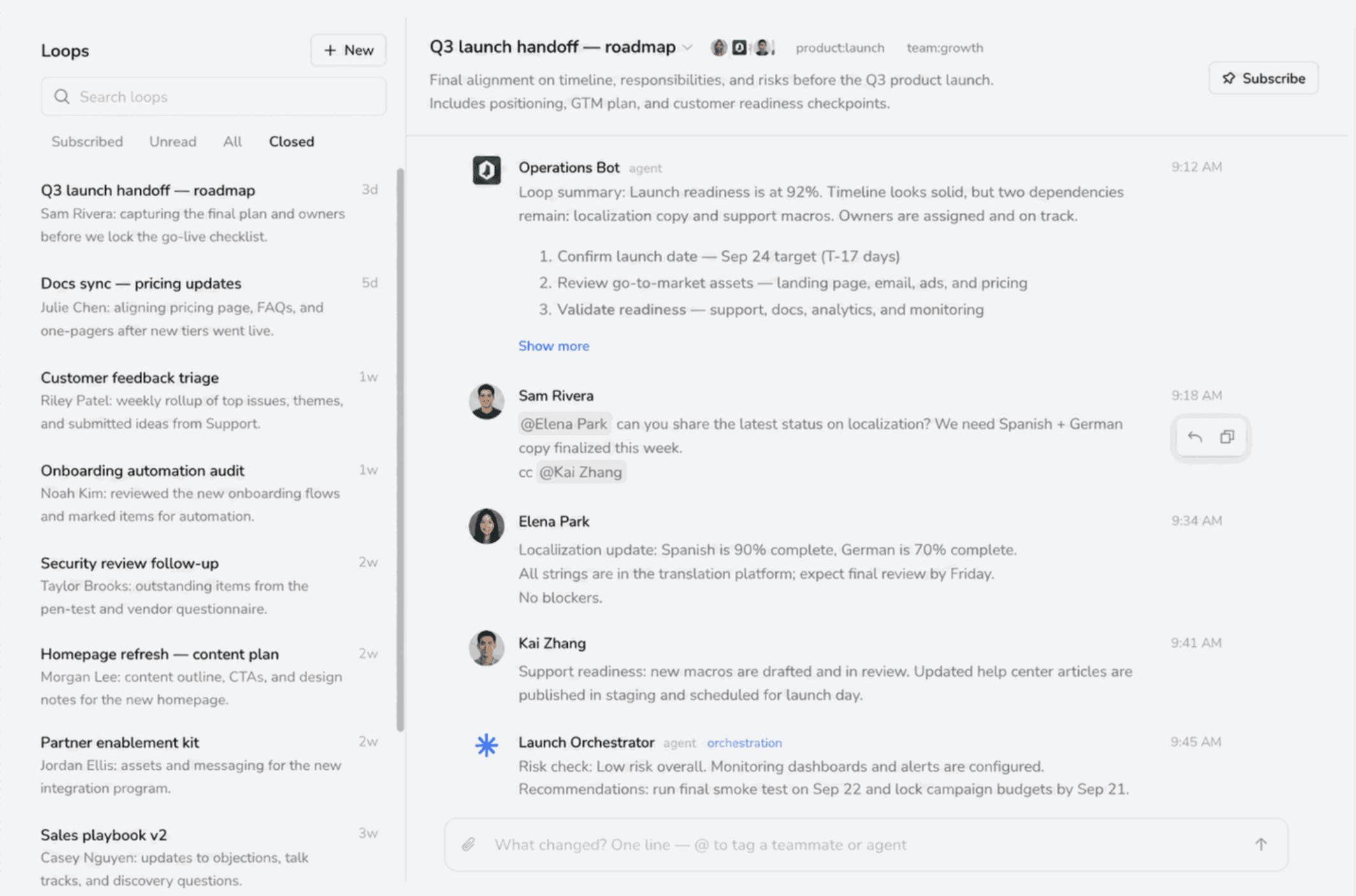
  • Loops. A Loop is the unit of shared work: a thread where people and agents coordinate around one item, with a single status, that closes when the work is done. Push, not poll. It is the handoff mechanism raw connectors lack.
  • Otto, the manager agent. Otto assigns work, chases follow-ups, records what happened, and links the receipt. The design principle we are strictest about is evidence gating: a write requires proof, and when the evidence is ambiguous Otto asks rather than guesses. That is a direct response to the third failure mode.

  • Connectors, still. AgentOS connects through MCP to Gmail, Slack, Google Drive, Calendar, Notion, GitHub, and hundreds more. Claude, ChatGPT, Cursor, and custom agents plug into the same shared context. We did not replace the connector layer. Everything above only works because that layer is solid.

A concrete example of both layers working together: a “Pipeline Health Daily Brief” that runs each weekday morning, pulls Salesforce data, summarizes the trend, flags anomalies, and posts to Slack. The connectors do the reaching. The workflow, the memory of what it said yesterday, and the record of who saw it are the office.

A rollout sequence that works

Four phases, in this order, for a reason.

  • Phase 1 — Map the handoffs, not the tasks (week 1). Do not inventory what people do. Inventory where work changes hands, because that is where time leaks. The finding is usually the same: the bottleneck is not any single step, it is the six transitions between them.

  • Phase 2 — Connect narrow, connect properly (weeks 2–3). Stand up the connector layer for the two or three systems the handoff map implicated. Use MCP. Scope permissions per user from day one, because retrofitting identity onto a working pilot is miserable and you will resent it.

  • Phase 3 — Automate one full path end to end (weeks 4–6). One complete process, including the human approval step. Not five half-processes. A single path that runs start to finish earns the next budget conversation; five partial ones are five things to maintain and nothing to show.

  • Phase 4 — Add the second agent, then the office (week 7+). The coordination layer earns its keep when two agents need to know about each other. Deploy it at that moment, not before.

Teams that sequence it this way tend to be measuring results in month one rather than still negotiating scope. Across our deployments that has landed at roughly a 35 percent reduction in manual work in the first month, with payback near the 45-day mark.

The honest caveat is that the variance is wide and driven almost entirely by what Phase 1 turns up. A clean handoff map produces fast results. A messy one produces a longer Phase 1.

What customers report is less about speed than about shape. One operations lead described the change this way:

“Six people whose entire job was moving information between systems. Three months in, two of them do actual project work.”

Another put the distinction in a sentence we have since borrowed: “Forty people all using AI individually. AgentOS is the first thing that made it a company capability.”

Connectors make individual agents useful. Coordination makes them a capability.

When you don’t need this. If you are running one agent, on one workflow, with two integrations, you do not need an office. You need a good connector and ten minutes. Adding a coordination layer to a single-agent deployment is overhead with no return. The threshold, in our experience, sits around the third agent or the second human handoff. Before that, keep it simple.

Summary

Agent connectors are the layer that lets an AI agent act on an external system. Assuming you can maintain them, owning them yourself is fine, and sometimes correct, but the maintenance burden, not the build, is what should drive the decision.

This piece covered six topics.

First, we defined agent connectors and broke down the four layers inside one: authentication and token lifecycle, tool definitions, execution and failure handling, and observability. The authentication layer is where in-house projects fail, and it fails at month four rather than week one.

Second, we looked at MCP. It is now the standard, adoption is steep, and the July 2026 release added production-grade Enterprise-Managed Authorization — which is what moves connector projects through security review.

Third, we worked the economics. For six integrations, in-house maintenance alone runs roughly 144 engineer-days a year. Build below three integrations, buy at five or more, and always buy when regulated data is involved.

Fourth, we surveyed the four camps of connector platform: developer-first, open-source, unified-API, and auth specialists — plus the platform-native option that Microsoft-stack companies frequently already own.

Fifth, we compared connectors with data lakes. Lakes answer questions across systems and time; connectors act on live systems. Use both under one identity, and confirm permissions survive ingestion before an agent touches the lake.

Finally, we examined where connectors and lakes both stop working. Agents with perfect access, live or historical, still cannot see each other’s work, hand off cleanly to humans, or explain why they acted. Those are coordination problems, and they need a layer above the connectors.

Build the connector layer first. Build the office when the second agent shows up.

Frequently asked questions

What is an agent connector?

An agent connector is the integration layer that lets an AI agent interact with external systems — apps, APIs, databases, and tools. It manages authentication, translates system capabilities into tool definitions the model can use, executes calls, and handles errors, so the agent never handles raw credentials.

What’s the difference between an agent connector and an API?

An API is designed for a developer who has read the documentation. An agent connector wraps that API for a model that hasn’t — adding self-describing tool definitions, managed OAuth, retries, and audit logging. The connector is the API made legible to a reasoning system.

Is MCP an agent connector?

MCP is the open standard that agent connectors increasingly use. An MCP server is a connector implementation; MCP is the protocol they speak. After the July 2026 update added production-grade Enterprise-Managed Authorization, MCP became the default choice for new enterprise connector work.

Should we build agent connectors or buy a platform?

Build if you have fewer than three integrations and they’re stable and internal. Buy if you have five or more, especially across third-party SaaS with OAuth, or if you touch regulated data. The deciding cost is ongoing maintenance, not initial build — roughly 144 engineer-days a year for six integrations.

Why do AI agent pilots fail even when the connectors work?

Because connectors solve access, not coordination. Agents with perfect system access still can’t see each other’s work, hand off cleanly to humans, or produce an evidence trail explaining why they acted. Those are coordination problems, and they need a layer above the connectors.

Do AI agents need a data lake, or are connectors enough?

Most production deployments use both. A data lake answers questions that span systems and time; connectors act on live systems and return current state. Run both under the same user identity, and confirm source permissions survive ingestion into the lake before an agent queries it.

How many agent connectors does a typical deployment need?

Fewer than teams expect. Most production deployments run well on three to six deeply integrated systems. Connector count is a poor proxy for capability — depth on the systems you depend on matters far more than breadth.

About Devcore

Devcore builds AI and automation systems for growing companies, and makes AgentOS, a shared workspace for AI agents and the people who work with them. If you’re mapping an agent deployment and want a second opinion on the sequencing, book a free assessment.

Endnotes

  1. Deloitte, 2026 Tech Trends (89 percent figure); 2026 State of AI Agents report (88 percent figure).

  2. U.S. Department of Justice, Antitrust Division, “Protecting Nascent Competition: Visa and Plaid Abandon Anticompetitive Merger,” Division Update, Spring 2021. Deal announced January 13, 2020; DOJ civil suit filed November 5, 2020; merger terminated January 12, 2021.

  3. MCP SDK download and registry figures compiled from public ecosystem reporting, 2026. Server counts vary by methodology; see the note to Exhibit 1.

  4. Model Context Protocol, July 2026 release, introducing production-grade Enterprise-Managed Authorization.

  5. Composio, “Agent Connectors: What They Are and the 5 Best Platforms in 2026,” for the platform landscape framing.

  6. Microsoft Learn, “Register MCP Servers as Agent Connectors for Microsoft 365.”

  7. Exhibit 2 cost model is illustrative and built on Devcore engagement assumptions, not a survey.

  8. Customer quotations were published as AgentOS testimonials at tryagentos.net in September 2026.

  9. Snowflake Documentation, “Snowflake-managed MCP server.” Vendor MCP support across Snowflake, Databricks, BigQuery, Redshift, ClickHouse, and MotherDuck compiled from 2026 ecosystem reviews.

  10. Databricks, “Databricks Agrees to Acquire Tabular, the Company Founded by the Original Creators of Apache Iceberg,” press release, June 4, 2024. Price per chief executive Ali Ghodsi’s remarks to CNBC (more than $1 billion); later press reports put it near $2 billion.

  11. Exhibit 3 is generalized from Devcore engagements, not surveyed.

Connectors and data lakes both give AI agents access to your stack. Neither gives them shared memory or clean handoffs, which is why most pilots stall before production.

The question, “Should you build your agent connectors or buy them?” reliably starts an argument among engineering leaders.

One camp says connectors are commodity plumbing — an afternoon with an OAuth library and you’re done. The other says the integration layer is the whole product and you should never own it yourself.

You may already have an answer. The proper response is, “It depends.”

Let’s take a step back. An agent connector is the layer that lets an AI agent act on an external system: read the Salesforce record, send the Slack message, update the Notion page, query the warehouse. Without one, a model can reason about your business but cannot touch it.

Here is why it depends. A connector is cheap to build once and expensive to own forever. The first one takes a competent engineer two to four weeks. The tenth one does not take ten times as long — it takes the rest of your roadmap, because every connected vendor ships breaking changes on a schedule you do not control.

So the question is not really build-or-buy. It is whether the integration layer is a thing you want to be in the business of maintaining.

Plaid is a useful illustration of how badly that question gets misjudged. Plaid built connectors to bank accounts — unglamorous infrastructure that most of fintech treated as plumbing. On January 13, 2020, Visa agreed to acquire the company for $5.3 billion, roughly double Plaid’s last private valuation. The Department of Justice sued to block the deal on November 5, 2020, arguing specifically that the acquisition would eliminate Plaid’s potential to compete in online debit. The deal was abandoned on January 12, 2021.

A connector layer does not get valued at $5.3 billion, or blocked on antitrust grounds, if it is plumbing. The boring layer was the strategic one.

That is the first thing to hold onto. Here is the second: connectors are necessary and they are not sufficient, and the gap between those two words is where most agent deployments die.

There is a second question sitting next to the first. Many teams already own a data lake. Why wire agents into every live system when they could read from the lake instead? That one also depends, and it gets its own section.

This piece covers six topics. First, we define agent connectors and break down the four layers inside one. Second, we look at how MCP changed what a connector is, with the adoption data. Third, we work through the economics of building versus buying, with the arithmetic shown. Fourth, we survey the platforms you would actually evaluate. Fifth, we compare connectors with data lakes, and when an agent should use each. Finally, we examine where both stop working — the coordination problems neither solves — and what sits above them.

Free access is not free coordination

Roughly nine in ten enterprise AI agent pilots never reach production. Deloitte’s 2026 Tech Trends report puts the figure at 89 percent. The 2026 State of AI Agents report puts it at 88 percent. The post-mortems are consistent, and they are not about models. The agent understood the task. It picked the right tool. What killed the pilot was identity, permissions, approval paths, audit trails, and the integration decisions nobody scoped.

Most of those are connector problems. Some of them are not, and telling the difference is the whole point of this piece.

What agent connectors actually are

The most common definition of an agent connector is the integration layer that lets an AI agent interact with external apps, services, databases, and tools.

Strip away the vendor language and a connector does three jobs:

  1. It holds credentials so the agent doesn’t. OAuth tokens, API keys, refresh cycles, per-user scoping.

  2. It translates. An API returns a 400-line JSON blob. A model needs a tool definition it can reason about. The connector sits between them.

  3. It executes and reports back. The call goes out, something happens, and the connector turns the result into something the agent can act on rather than hallucinate around.

The one adjustment we make to this definition is to include observability inside it rather than treat it as a separate concern. The reason is practical: a connector you cannot audit is one your security team will not approve, which makes it a connector you do not actually have. In our experience the logging requirement is what determines whether a pilot ships, so we count it as part of the thing rather than an add-on.

The distinction that matters throughout: an API is built for a developer who read the documentation. An agent connector is built for a model that didn’t.

That sounds cosmetic. It isn’t. A tool description that’s ambiguous about whether date means created-at or modified-at produces wrong answers indefinitely, and no prompt engineering fixes it upstream.

The four layers under every agent connector

Authentication and token lifecycle

This is where in-house connector projects die. Not at the first OAuth handshake — that part is a weekend.

It dies at month four, with sixty users, each holding their own Google and Slack and HubSpot tokens, half expired, and no clean way to scope what the agent may do as a given user versus on its own authority.

Credential exposure is the leading security concern in agent deployments. Agents holding API keys, database passwords, and OAuth tokens can leak them through prompts, logs, or error messages. A serious connector layer means the agent never sees the secret.

Tool definitions the model can read

Every connected system needs its capabilities expressed as typed, named, described tools. Get this wrong and the agent calls the right system the wrong way.

There is a real tension here that nobody advertises. Platforms that normalize across vendors — one create_ticket that works for Jira, Linear, and Zendesk — buy you speed and cost you semantics. The normalized schema strips the fields that made each system specific.

For simple operations that trade is fine. For anything carrying real business logic, you want the native surface.

Execution and failure handling

Rate limits. Retries with backoff. Partial failures where three of five records wrote. Idempotency, so a retried call doesn’t send the invoice twice.

This is unglamorous and it is most of the work. It is also the difference between a demo and a system.

Observability

Every tool call, visible: what the agent invoked, with what arguments, on whose behalf, what came back, how long it took.

Without this you cannot debug a bad outcome and you certainly cannot pass a security review.

Mcp changed what a connector is

Through 2024 and most of 2025, every connector was bespoke. Each framework had its own tool format, and an integration written for one agent was worthless to the next.

The Model Context Protocol collapsed that. MCP is an open standard for how agents discover and call tools, and the adoption curve is steep enough to settle the question of whether to standardize on it.

MCP adoption indicators 2025–2026: SDK downloads, servers and platform support

Note: Server counts vary materially by methodology. Some sources count only verified-runnable servers; others count every catalogued instance, which is how one dataset reaches roughly 90,000. Treat the registry figure as the conservative one.

The July 2026 release was the consequential one. MCP moved from a tool-calling API toward an operating layer for agents, and Enterprise-Managed Authorization graduated from experimental to production-grade.

That second part unblocked a lot of stalled procurement. EMA gives a security team a real answer to “who authorized this agent to do that, and can we revoke it centrally?”

For a buyer, three consequences follow:

  • Write once. An MCP server built for one agent works with Claude, ChatGPT, Cursor, and whatever you adopt in eighteen months.

  • Your integration work outlives your model choice. This is the strongest argument for standardizing on MCP even if you are happy with your current stack.

  • Security review gets a vocabulary. “It’s MCP with EMA and scoped OAuth” is a sentence a CISO can evaluate. “We wrote a custom wrapper” is not.

The economics of build versus buy

The comparison content on this topic tends to skip the money. Let’s do the arithmetic.

Assume a mid-market team with six integrations. Each takes three engineering weeks to build and roughly two engineer-days per month to maintain — version changes, expired credentials, schema drift, the occasional outage.

The build is 18 weeks of engineering (18 = 6 × 3). The maintenance is 144 engineer-days per year (144 = 6 × 2 × 12). At a loaded rate of $600 per day, the maintenance alone runs $86,400 annually, and that number grows with every integration added and never shrinks on its own.

Three-year cost of building vs buying agent connectors for six integrations

The honest heuristic we use with clients:

  • Fewer than three integrations, stable, internal? Build. A platform is overhead you don’t need.

  • Five or more, spanning third-party SaaS with real auth? Buy. You will not win the maintenance race.

  • Anything touching regulated data or customer PII? Buy, and buy the one with the audit log your compliance team will accept.

The number that matters is not the license fee. It is whether the thing still works in month nine without an engineer babysitting it.

Who you’d actually buy from

The market sorted itself into four camps during 2025 and 2026. We have clients running on most of these. The following observations describe the shape of each camp rather than specific feature sets, which change monthly:

  • Developer-first connector platforms. Composio is the reference point, with a large prebuilt catalogue and an explicitly agent-shaped design. You get breadth and speed. You write code, and you accept their schema decisions.

  • Open-source and self-hosted. Nango is where teams land when data residency or exit cost is the deciding factor. More setup, more control, no vendor holding your integration layer.

  • Unified-API aggregators. Merge and StackOne normalize whole categories, so one integration covers every CRM or every HRIS. Strong when you are building a product that must support whatever your customer already uses. Weaker when you need the native semantics of one system, for the schema-stripping reason above.

  • Auth-and-execution specialists. Arcade.dev and Pipedream Connect concentrate on the genuinely hard part: per-user authorization and safe execution. If your blocker is “the agent needs to act as this specific employee with exactly their permissions,” start here.

The platform-native option is easy to overlook. Microsoft ships agent connectors for Microsoft 365 that register MCP servers directly into Teams and Copilot. If your company lives in that stack, the cheapest integration is frequently the one you are already licensed for.

Two closing notes on evaluation. The catalogue size on a vendor homepage is close to irrelevant — open the docs for your four critical systems and read the supported actions, because that is the only comparison that predicts anything. And this market moves quickly enough that any specific claim here has a shelf life. Verify pricing and coverage directly.

Six things to check before you commit

  1. Depth per integration, not count. “1,000+ connectors” is a marketing number. Check your four. Ignore the rest.

  2. Auth model, specifically multi-user. Can the agent act as a specific user with that user’s permissions? If every action runs as one shared service account, you have built a privilege-escalation machine and you will find out during audit.

  3. Write-path safety. Reads are forgiving. Writes are not. Look for approval gates, dry-run modes, and idempotency on anything that sends, charges, posts, or deletes.

  4. Revocation latency. When you remove someone’s access, does the agent lose it immediately or at the next token refresh? Ask for the answer in seconds.

  5. Observability an auditor will accept. Not a dashboard — an exportable, per-call record with user identity attached.

  6. Exit cost. If you leave, do you keep anything? Platforms built on open MCP servers are meaningfully easier to walk away from. Ask before you sign.

Agent connectors versus data lakes

There is a second argument that runs alongside build-or-buy. If you have already invested in a data lake, why wire agents into every live system at all? Point them at the lake and let them read. The proper response, again, is “It depends” — on whether the agent needs to know something or do something.

A data lake centralizes data from many systems, usually on cheap object storage, for analysis across all of it. For an agent, that means breadth and history: three years of orders, tickets, and invoices in one queryable place. A connector is narrower and live. It reaches one system as it stands right now, and it can act — send, update, approve.

The lake vendors have noticed agents. Snowflake, Databricks, Google BigQuery, Amazon Redshift, ClickHouse, and MotherDuck all now offer official or vendor-backed MCP servers, so a lake can be exposed to an agent through the same protocol as any SaaS tool. Snowflake’s managed server, for instance, uses Snowflake’s built-in OAuth and runs each session under the user’s default role. The table layer underneath is being valued the way Plaid was. On June 4, 2024, Databricks agreed to acquire Tabular, the company founded by the original creators of the Apache Iceberg table format. Its chief executive put the price at more than $1 billion; later reporting put it closer to $2 billion. Once again, the unglamorous layer that lets systems read each other’s data was the strategic one.

Agent connectors vs data lakes compared: freshness, write-back, permissions

The permissions row deserves a closer look. Access rules usually live at the document or record level in the source system. When that data is copied into a lake — or chunked into embeddings for retrieval — the rules often do not come along. An agent querying the lake can then surface what the person asking could never have opened in the original tool.

The fix, sometimes called entitlement propagation, carries source permissions into the lake and filters by them at query time. Ask whether your stack does it before an agent is pointed at the lake, not after.

The pattern we recommend is both, with a clear division of labor:

  • Lake for questions. Analysis, trends, anything spanning systems or years.

  • Connectors for actions. Anything that changes a record, sends a message, or needs the current state.

  • One identity for both. The agent should act as the same user, with the same permissions, whichever path it takes.

Notice what neither provides. A connector gives an agent live access. A lake gives it historical access. Both are access. Neither records what the agents themselves did, decided, or handed off — which is the subject of the next section.

Where agent connectors stop working

Here is the part the platform comparisons do not cover, because it is not a connector problem and no connector vendor is incentivized to raise it.

You can do everything above correctly — clean MCP layer, scoped OAuth, full audit trail, every system connected, a well-governed lake behind it — and still land in the 88 percent. We have watched it happen more than once. The connectors work perfectly and the deployment stalls anyway.

Three failure modes. They are the same shape:

  • Every agent has amnesia. Your support agent resolves a billing dispute. Your account agent, running twenty minutes later, has no idea it happened. Both are connected to the same Stripe and the same Zendesk. Connectors gave them access to identical data and left them with zero shared understanding of it.

  • There is no handoff, only re-work. Real processes cross boundaries: an agent drafts, a human approves, another agent executes. Without a shared place for that work to live, the handoff becomes a person copying context out of one tool and pasting it into another — precisely the manual labor the deployment was meant to remove. This is the most common way an automation ends up net-neutral on time saved.

  • Nobody can reconstruct what happened. Your connector log says the agent called update_opportunity at 14:32 with a payload. It does not say why, what the agent believed, or what evidence it acted on. When a customer disputes the outcome, a payload is not an answer. The common thread is that each of these is a coordination failure, not an access failure. Connectors are an access technology. They solve access completely and coordination not at all. Coordination is what the second year of an agent deployment is entirely about.

The Layer Above the Connector

This is the problem we built AgentOS to solve, so treat what follows as interested rather than neutral. The reasoning is the part worth taking.

Our framing is that every agent you use today is a remote worker with amnesia. Individually capable, permanently context-free, no memory of yesterday and no awareness of colleagues.

Connectors give that worker building access. They do not give them a desk, a team, or a manager.

So AgentOS is the office. Four things sit on top of the connector layer:

  • Shared memory. One wiki, one set of SOPs, one source of company knowledge that every agent and every person reads from. When the support agent resolves the dispute, the account agent knows — not because they were wired together, but because they work in the same place.

  • Loops. A Loop is the unit of shared work: a thread where people and agents coordinate around one item, with a single status, that closes when the work is done. Push, not poll. It is the handoff mechanism raw connectors lack.

  • Otto, the manager agent. Otto assigns work, chases follow-ups, records what happened, and links the receipt. The design principle we are strictest about is evidence gating: a write requires proof, and when the evidence is ambiguous Otto asks rather than guesses. That is a direct response to the third failure mode.

  • Connectors, still. AgentOS connects through MCP to Gmail, Slack, Google Drive, Calendar, Notion, GitHub, and hundreds more. Claude, ChatGPT, Cursor, and custom agents plug into the same shared context. We did not replace the connector layer. Everything above only works because that layer is solid.

A concrete example of both layers working together: a “Pipeline Health Daily Brief” that runs each weekday morning, pulls Salesforce data, summarizes the trend, flags anomalies, and posts to Slack. The connectors do the reaching. The workflow, the memory of what it said yesterday, and the record of who saw it are the office.

A rollout sequence that works

Four phases, in this order, for a reason.

  • Phase 1 — Map the handoffs, not the tasks (week 1). Do not inventory what people do. Inventory where work changes hands, because that is where time leaks. The finding is usually the same: the bottleneck is not any single step, it is the six transitions between them.

  • Phase 2 — Connect narrow, connect properly (weeks 2–3). Stand up the connector layer for the two or three systems the handoff map implicated. Use MCP. Scope permissions per user from day one, because retrofitting identity onto a working pilot is miserable and you will resent it.

  • Phase 3 — Automate one full path end to end (weeks 4–6). One complete process, including the human approval step. Not five half-processes. A single path that runs start to finish earns the next budget conversation; five partial ones are five things to maintain and nothing to show.

  • Phase 4 — Add the second agent, then the office (week 7+). The coordination layer earns its keep when two agents need to know about each other. Deploy it at that moment, not before.

Teams that sequence it this way tend to be measuring results in month one rather than still negotiating scope. Across our deployments that has landed at roughly a 35 percent reduction in manual work in the first month, with payback near the 45-day mark.

The honest caveat is that the variance is wide and driven almost entirely by what Phase 1 turns up. A clean handoff map produces fast results. A messy one produces a longer Phase 1.

What customers report is less about speed than about shape. One operations lead described the change this way:

“Six people whose entire job was moving information between systems. Three months in, two of them do actual project work.”

Another put the distinction in a sentence we have since borrowed: “Forty people all using AI individually. AgentOS is the first thing that made it a company capability.”

Connectors make individual agents useful. Coordination makes them a capability.

When you don’t need this. If you are running one agent, on one workflow, with two integrations, you do not need an office. You need a good connector and ten minutes. Adding a coordination layer to a single-agent deployment is overhead with no return. The threshold, in our experience, sits around the third agent or the second human handoff. Before that, keep it simple.

Summary

Agent connectors are the layer that lets an AI agent act on an external system. Assuming you can maintain them, owning them yourself is fine, and sometimes correct, but the maintenance burden, not the build, is what should drive the decision.

This piece covered six topics.

First, we defined agent connectors and broke down the four layers inside one: authentication and token lifecycle, tool definitions, execution and failure handling, and observability. The authentication layer is where in-house projects fail, and it fails at month four rather than week one.

Second, we looked at MCP. It is now the standard, adoption is steep, and the July 2026 release added production-grade Enterprise-Managed Authorization — which is what moves connector projects through security review.

Third, we worked the economics. For six integrations, in-house maintenance alone runs roughly 144 engineer-days a year. Build below three integrations, buy at five or more, and always buy when regulated data is involved.

Fourth, we surveyed the four camps of connector platform: developer-first, open-source, unified-API, and auth specialists — plus the platform-native option that Microsoft-stack companies frequently already own.

Fifth, we compared connectors with data lakes. Lakes answer questions across systems and time; connectors act on live systems. Use both under one identity, and confirm permissions survive ingestion before an agent touches the lake.

Finally, we examined where connectors and lakes both stop working. Agents with perfect access, live or historical, still cannot see each other’s work, hand off cleanly to humans, or explain why they acted. Those are coordination problems, and they need a layer above the connectors.

Build the connector layer first. Build the office when the second agent shows up.

Frequently asked questions

What is an agent connector?

An agent connector is the integration layer that lets an AI agent interact with external systems — apps, APIs, databases, and tools. It manages authentication, translates system capabilities into tool definitions the model can use, executes calls, and handles errors, so the agent never handles raw credentials.

What’s the difference between an agent connector and an API?

An API is designed for a developer who has read the documentation. An agent connector wraps that API for a model that hasn’t — adding self-describing tool definitions, managed OAuth, retries, and audit logging. The connector is the API made legible to a reasoning system.

Is MCP an agent connector?

MCP is the open standard that agent connectors increasingly use. An MCP server is a connector implementation; MCP is the protocol they speak. After the July 2026 update added production-grade Enterprise-Managed Authorization, MCP became the default choice for new enterprise connector work.

Should we build agent connectors or buy a platform?

Build if you have fewer than three integrations and they’re stable and internal. Buy if you have five or more, especially across third-party SaaS with OAuth, or if you touch regulated data. The deciding cost is ongoing maintenance, not initial build — roughly 144 engineer-days a year for six integrations.

Why do AI agent pilots fail even when the connectors work?

Because connectors solve access, not coordination. Agents with perfect system access still can’t see each other’s work, hand off cleanly to humans, or produce an evidence trail explaining why they acted. Those are coordination problems, and they need a layer above the connectors.

Do AI agents need a data lake, or are connectors enough?

Most production deployments use both. A data lake answers questions that span systems and time; connectors act on live systems and return current state. Run both under the same user identity, and confirm source permissions survive ingestion into the lake before an agent queries it.

How many agent connectors does a typical deployment need?

Fewer than teams expect. Most production deployments run well on three to six deeply integrated systems. Connector count is a poor proxy for capability — depth on the systems you depend on matters far more than breadth.

About Devcore

Devcore builds AI and automation systems for growing companies, and makes AgentOS, a shared workspace for AI agents and the people who work with them. If you’re mapping an agent deployment and want a second opinion on the sequencing, book a free assessment.

Endnotes

  1. Deloitte, 2026 Tech Trends (89 percent figure); 2026 State of AI Agents report (88 percent figure).

  2. U.S. Department of Justice, Antitrust Division, “Protecting Nascent Competition: Visa and Plaid Abandon Anticompetitive Merger,” Division Update, Spring 2021. Deal announced January 13, 2020; DOJ civil suit filed November 5, 2020; merger terminated January 12, 2021.

  3. MCP SDK download and registry figures compiled from public ecosystem reporting, 2026. Server counts vary by methodology; see the note to Exhibit 1.

  4. Model Context Protocol, July 2026 release, introducing production-grade Enterprise-Managed Authorization.

  5. Composio, “Agent Connectors: What They Are and the 5 Best Platforms in 2026,” for the platform landscape framing.

  6. Microsoft Learn, “Register MCP Servers as Agent Connectors for Microsoft 365.”

  7. Exhibit 2 cost model is illustrative and built on Devcore engagement assumptions, not a survey.

  8. Customer quotations were published as AgentOS testimonials at tryagentos.net in September 2026.

  9. Snowflake Documentation, “Snowflake-managed MCP server.” Vendor MCP support across Snowflake, Databricks, BigQuery, Redshift, ClickHouse, and MotherDuck compiled from 2026 ecosystem reviews.

  10. Databricks, “Databricks Agrees to Acquire Tabular, the Company Founded by the Original Creators of Apache Iceberg,” press release, June 4, 2024. Price per chief executive Ali Ghodsi’s remarks to CNBC (more than $1 billion); later press reports put it near $2 billion.

  11. Exhibit 3 is generalized from Devcore engagements, not surveyed.

YOUR FIRST STEP

Book a free 30-minute call.

Book a call

Book a call

My job is to make sure you leave the first call with a clear, actionable plan.

Jessica Burns

Client Success Manager

YOUR FIRST STEP

Book a free 30-minute call.

Book a call

Book a call

My job is to make sure you leave the first call with a clear, actionable plan.

Jessica Burns

Client Success Manager

YOUR FIRST STEP

Book a free 30-minute call.

Book a call

Book a call

My job is to make sure you leave the first call with a clear, actionable plan.

Jessica Burns

Client Success Manager